BASICS Cognitive Skills App for Kids: Guided Games and Offline Practice
By Wellness Hub
Last Updated: August 10, 2026
Explore matching, memory, patterns and early reasoning games – and learn how to connect app practice with everyday play.
A cognitive skills app for kids can give a child short practice with tasks such as matching, sorting, remembering a rule and completing a simple pattern. BASICS combines 250+ learning games with a separate parent-guided plan built around three daily activities. These activities can support practice on specific tasks; they do not assess cognition or guarantee broader improvement in attention, memory, reading, maths or classroom learning.
The useful question is not whether a child has completed a level. It is what the child understood, what support they needed and whether a similar idea can be explored with real objects, conversation or play. BASICS can provide a structured starting point, while the parent-child interaction gives the practice meaning beyond the screen.
Cognitive Skills Contribute to Everyday Learning
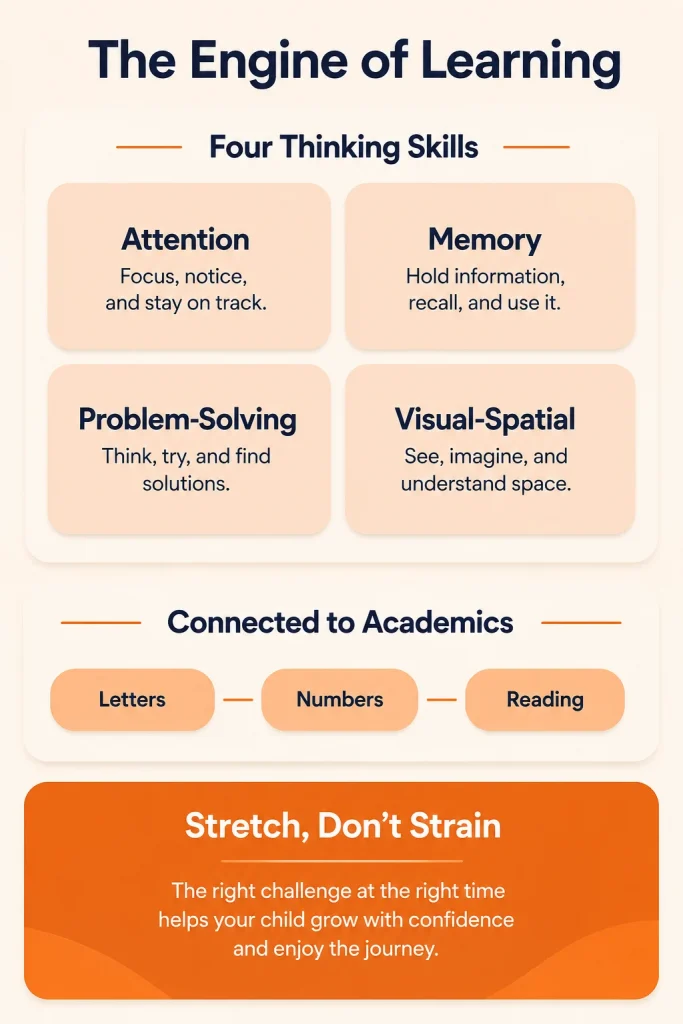
Attention, working memory, problem-solving and visual-spatial thinking all contribute to learning. A child may use them while following a short instruction, finding two matching objects, remembering what comes next in a game or working out how puzzle pieces fit. They are important, but they are not the only influences on learning.
Performance also depends on language comprehension, prior experience, interest, sleep, health, hearing, vision, sensory demands, anxiety and the environment. A child who struggles with one spoken task may attend well to a hands-on activity. A child may also listen while moving, fidgeting, standing or looking away. Quiet sitting is not proof of attention.
Look for meaningful participation instead: does the child notice the relevant information, respond on purpose, remember the rule, return to the task after a distraction or show you what they understood? Those observations are more useful than judging attention by stillness or eye contact.
What Are Cognitive Skills?
Cognition is a broad term for the mental processes involved in noticing, understanding, remembering and using information. In young children, parents often see these processes during ordinary play rather than as separate skills.
- Attention: noticing what matters, staying with an activity for a manageable time and returning after a distraction.
- Working memory: holding a small amount of information in mind while using it, such as remembering a two-part game rule.
- Problem-solving: trying a possible answer, noticing what happened and changing the approach when needed.
- Visual-spatial thinking: noticing shape, size, position, direction and how parts relate to one another.
These labels describe what a task may involve; they do not explain why a particular child finds it easy or difficult. An app activity is not a cognitive assessment and should not be used to diagnose an attention, learning or developmental condition.
How Children Practise Thinking Skills in BASICS
It helps to distinguish two parts of BASICS. The parent-guided plan starts with questions about observable skills, suggests goal areas, provides three daily activities with demonstrations and parent tips, and lets the parent record how practice went. Separately, the app offers more than 250 child-facing games across Speech & Language, Academics, and Feelings & Friendships.
BASICS includes tasks such as matching, sorting, sound recognition, short memory challenges, sequences and simple patterns. These can give a child practice with a clear rule or relationship. These games sit within the app’s three game worlds rather than forming a cognitive assessment, and completing them should not be treated as a cognitive score.
Practising Focus Through Short, Clear Tasks
A focus task should make the target obvious. Reduce unrelated noise or visual clutter, give one short direction and allow time to respond. Play alongside your child at first so you can see whether they understand the rule rather than tapping until something happens.
Notice whether the child looks or listens for the relevant clue, makes a purposeful choice and can return after a brief distraction. If they begin guessing rapidly, repeatedly leave, cover their ears, push the device away or become upset, pause. The task may be unclear, inaccessible, tiring or simply a poor fit at that moment.
Practising Memory Within a Game
A memory game may ask a child to remember where an item appeared, hold a short sequence in mind or recall the current rule. Explain or model one round, then give the child time to try. If the language is too complex, simplify the instruction before assuming the child has a memory difficulty.
Improving within that game shows learning of that task. It does not, by itself, show that the child will remember classroom directions, daily routines or information presented in another format. Record the kind of help used – a repeat, picture, gesture or model – because support level matters more than a single correct answer.
Working Out Patterns, Matches and Simple Problems
Matching, sorting and pattern tasks ask the child to notice a relationship. Begin with one clear feature, such as same picture, same colour or same shape. When the child understands that rule, try a different example rather than assuming one successful screen item proves a general concept.
Problem-solving is easier to observe when you watch the process. Does the child check the choices, try one idea, notice an error and adjust? A wrong response can be useful information, but do not assume every BASICS game gives teaching feedback in the same way. If needed, model your own reasoning briefly: “These two are the same shape. This one is different.”
Choose a Manageable Challenge and Know When to Stop
Do not assume that every game will adjust automatically or begin at the right difficulty for your child. Parents can keep practice manageable by choosing a simpler activity, modelling the first turn, reducing the number of choices or ending the session before frustration builds.
Stop if the child shows pain, marked fatigue, distress, repeated avoidance or difficulty accessing the pictures, sounds or controls. Taking a break is not a failed session. A child may learn more from one understood turn than from a long run of guesses made under pressure.
Thinking Games and Direct Academic Practice Are Different
The BASICS Academics world includes direct practice with letters, letter sounds, numbers, counting and spelling. Those activities teach or rehearse specific academic content. A matching or memory task may involve attention or recall, but it should not be presented as a shortcut to reading or maths.
Choose the task that matches the current goal. If the goal is recognising the letter M, use direct letter practice and then find M in a book or sign. If the goal is following a sorting rule, sort pictures in the game and then sort real objects. Keeping the goal specific makes it easier to see what the child is actually learning.
What Games Can and Cannot Do
Games can make repetition easier to accept, provide a clear rule and give a child chances to practise. Interest supports participation, but engagement is not proof of learning. A child can enjoy an animation, memorise a response or tap quickly without understanding the concept.
It helps to separate four different outcomes: improvement in the practised game, performance on a similar task, use of the idea with adult support and independent use in everyday life. Research on children’s working-memory training commonly finds gains on trained or closely related tasks, while broader transfer to attention, intelligence and academic achievement is weak or inconsistent. See this meta-analysis of working-memory training.
Screen activities also should not crowd out sleep, movement, face-to-face conversation, shared reading or hands-on play. The American Academy of Pediatrics technical report on digital media notes that even high-quality media with adult co-use does not offer the same benefits as attentive, device-free interaction. Use the app as one tool within a varied day, not as a substitute for real-world learning.
Connect App Practice With Everyday Play
There is no universal number of minutes or days that guarantees improvement. Use a brief session when your child is comfortable and interested, and stop when participation drops. On a rushed, tired or difficult day, it is reasonable to skip the game.
- Name the game rule. Use one plain sentence such as “Find the same picture” or “Remember where the star was.”
- Play one or two purposeful turns. Model if needed, wait for a response and notice what support helps.
- Move to real objects. Match socks, pair lids with containers, copy a two-block pattern or sort spoons and cups by one visible feature.
- Change one detail. Use new objects or a different room to see whether the idea is understood, without turning the activity into a test.
- Record the support, not just the answer. Note whether the child needed a model, repeat, gesture, choice or break.
A successful screen turn may not carry over immediately. The offline activity gives the child a fresh, meaningful chance to use the same relationship, while letting the parent see what remains easy or difficult.
What BASICS Offers Parents and Children
The current BASICS App Guide and current store listings describe the following features:
- A parent-guided plan: parents answer questions about observable skills, review suggested goals and receive three guided activities.
- Demonstrations and parent guidance: activities include a demonstration, steps, prompts and tips for practising together.
- A separate game catalogue: more than 250 games across Speech & Language, Academics, and Feelings & Friendships.
- A practice record: parents rate how an activity went and can review goal-by-goal practice; the record is not a clinical assessment of cognition or mastery.
- No streaks or child-to-child comparisons: the current listings state that children are not ranked against one another.
BASICS content is developed by a multidisciplinary team that includes speech therapists, occupational therapists, behavioural therapists, special educators and child psychologists. Their involvement explains who creates the content; it does not show that the app has clinically demonstrated broad cognitive or academic outcomes. The app can support home practice and work alongside professional care; it does not replace assessment or an individual treatment or education plan.
Explore Guided Practice With BASICS Premium
Parents can explore BASICS on Google Play or the Apple App Store. Use the games as short, shared practice and connect one clear idea with objects or play away from the screen. Do not use the app to test or label your child’s attention, memory or intelligence.

Know What to Practise With Your Child Today


Who May Find These Activities Useful?
BASICS may be useful for a parent who wants a clearer way to choose a short activity, play alongside their child and carry one idea into hands-on play. It may also complement goals already chosen with a therapist or teacher. A diagnosis is not required to use the app, but the app cannot determine why a child is having difficulty.
Usability varies. A child may need support to see the pictures, hear the audio, understand the language, control the device or tolerate the sensory demands. Offer another way to respond when possible, and do not push through distress or treat access difficulty as a thinking problem.
Speak with your child’s paediatrician or another qualified professional when attention, memory or problem-solving difficulties persist across settings, regularly interfere with communication, play, learning or routines, or cause significant distress. Ask for help promptly if a difficulty begins suddenly, follows a head injury or illness, is accompanied by unusual staring or movements, involves loss of awareness, or includes loss of a previously used skill.
Hearing, vision, sleep, language and medical factors may need to be considered. Depending on the concern, support may involve a paediatrician, psychologist, speech-language pathologist, audiologist, occupational therapist, school team or another relevant specialist. The CDC advises families to act early when development causes concern or a child loses skills.
What Parents Should Take Away
A well-chosen game can give a child useful practice with one rule, relationship or set of information. Keep the target specific, play alongside your child, watch how they respond and move one idea into real objects or shared play. Improvement in the game is worth noticing, but it is not the same as a general increase in attention, memory or intelligence.
BASICS can make practice easier to organise through a parent-guided plan, short activities, demonstrations and learning games. Its role is to support practice, not to diagnose a difficulty, replace direct interaction or promise academic outcomes. When a concern affects daily life or development, combine careful observation with qualified professional guidance.
Clinically Reviewed By
Reviewed by Rajini Darugupally, M.Sc. Speech Language Pathology, Speech Language Pathologist at Wellness Hub.
Rajini supports children with speech and language delays, receptive and expressive language difficulties, social communication needs, autism, ADHD, and parent-guided home practice. This article was reviewed for clinical accuracy, parent-friendly language, and safe guidance.
This content is for educational purposes only and does not replace professional assessment, diagnosis, or therapy.
View Rajini Darugupally’s Profile
Related Reading and Sources
- BASICS App Guide: Speech Therapy, Autism and Early Intervention Activities for Kids
- Storytelling Activities for Kids: Build Narrative Language at Home
- How to Teach Self-Regulation to Children: 8 Practical Strategies
References and further reading
- BASICS App Guide – current plan, activities, games and product boundaries
- Apple App Store – current BASICS features and subscription terms
- Google Play – current BASICS modules and learning-game catalogue
- Melby-Lervag, Redick and Hulme – working-memory training meta-analysis
- American Academy of Pediatrics – Digital Ecosystems, Children, and Adolescents
- CDC – Learn the Signs. Act Early.
Book your Free Consultation Today
Parent/Caregiver Info:
Client’s Details:
* Error Message