BASICS Learning Games for Kids: Speech, Academics and Social-Emotional Play
By Wellness Hub
Last Updated: August 11, 2026
A parent guide to the three BASICS game worlds, shared play and practical offline connections.
BASICS learning games for kids provide more than 250 child-facing activities across three current game worlds: Speech & Language, Academics, and Feelings & Friendships. Children can practise specific tasks involving words, sounds, letters, numbers, emotions, matching and simple rules. The games are an extra practice area within BASICS; they are separate from the app’s parent-guided goal plan and do not guarantee changes in communication, learning, behaviour or everyday functioning.
The most useful way to judge a learning game is not by its label, colours or rewards. Watch what your child is actually doing: Do they understand the rule? Are their choices purposeful? What support helps? Can you explore the same idea with real objects or conversation? Those questions make screen-based practice more informative and reduce the risk of mistaking taps or completed levels for broader learning.
What BASICS Learning Games Are Designed to Practise
BASICS states that its content is created by a multidisciplinary team that includes speech therapists, occupational therapists, behavioural therapists, special educators and child psychologists. That tells parents who contributes to the content and the kinds of goals the activities are intended to address. It does not mean that every game has been clinically tested or that playing produces a guaranteed developmental result.
A game can offer structured practice with a narrow target. A vocabulary activity may ask a child to connect a spoken word with a picture. An academic activity may involve counting a set of objects. A feelings activity may invite a child to identify an emotion shown in a face or situation. These are useful practice opportunities when the child understands the task, but success in the game is not the same as spontaneous communication, school achievement or coping during a difficult real-life moment.
BASICS can support home practice and work alongside goals chosen with a therapist or teacher. It does not assess a child’s development, diagnose a condition or replace individual professional guidance where that is needed.
What Makes BASICS Games Different
The current app and store listings document several useful differences. Individual game mechanics may vary, so parents should choose an activity by its task and by how their child responds rather than assuming every game uses the same difficulty, feedback, timing or score format.
- More than 250 games: the catalogue spans Speech & Language, Academics, and Feelings & Friendships.
- Multidisciplinary content development: the current listings identify therapists, special educators and child psychologists as contributors.
- No streaks: children are not required to return each day to preserve a usage streak.
- No child-to-child comparisons: the current product description says children are not ranked against one another.
- A wider parent workflow: the games sit alongside guided parent-child activities rather than serving as the whole BASICS routine.
These features may make the catalogue easier for some families to use. They do not establish that every game will suit every child or that the app will automatically choose the right level. Parents should still check whether the language, pictures, sound and controls are understandable and comfortable.
Explore the Three BASICS Game Worlds
The current BASICS listings organise games into three worlds. Treat these as broad content areas, not as proof that a child has mastered a developmental domain. Choose a game because its task matches the child’s current goal, then observe the support needed.
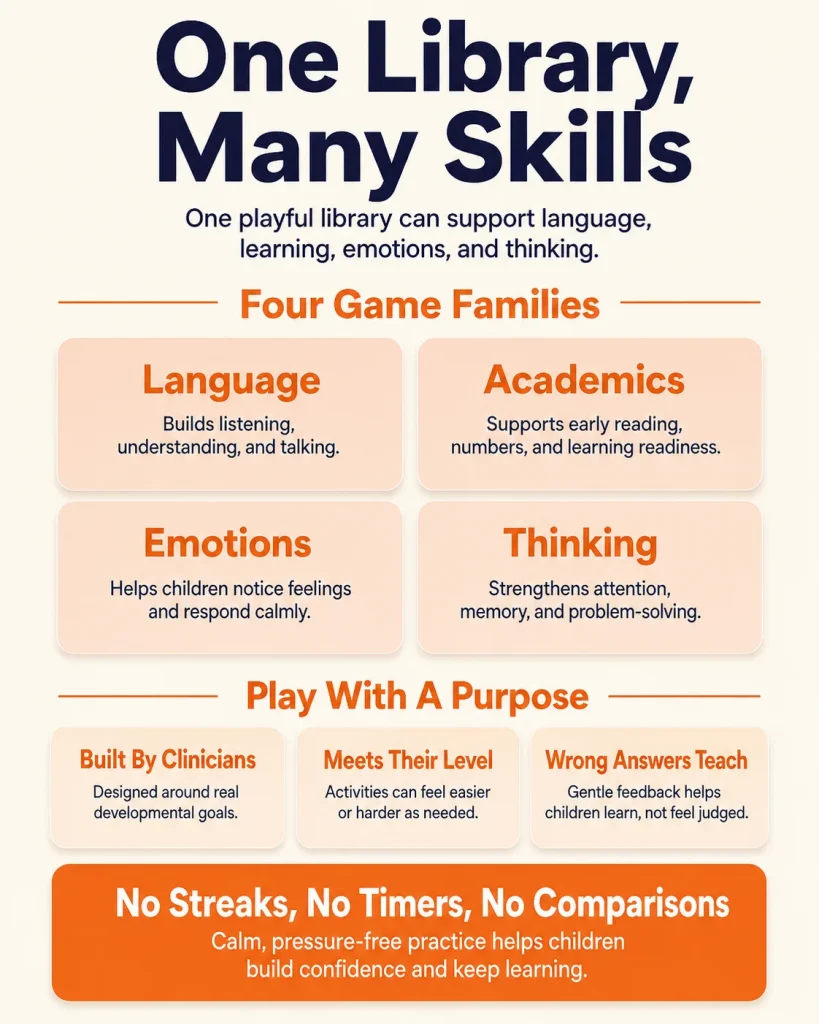
Speech & Language Games
Speech & Language games include practice related to words, phrases, sentences, questions and social communication. In a simple vocabulary task, for example, a child might hear or see a word and select the matching picture. That can practise recognition and comprehension within the activity. It does not show that the child will independently say the word, combine it in a sentence or use it in conversation.
Play alongside your child for at least the first few turns. Name the target naturally, wait for a response and accept speech, gesture, pointing, signs or an AAC response when the activity permits. Afterwards, use the same word during shared play or a routine: if the game practised ‘cup,’ comment on the cup while pouring water instead of repeatedly testing the child with ‘What is this?’
Academic Games
Academic games cover specific early-learning content such as letters, letter sounds, numbers, counting and spelling. A counting task may show a small group of objects and ask the child to choose the matching number. This can provide direct practice with one academic idea, especially when the child understands the words, pictures and response method.
Keep the claim as specific as the task. Correctly counting four objects in a game does not establish general school readiness or broad maths improvement. You can extend the idea by counting four spoons at the table or finding a practised letter in a familiar book. If the child guesses or relies on the same picture arrangement, change the objects and see whether the concept still makes sense.
Social-Emotional Learning Games
Feelings & Friendships games provide calm-time practice with emotions, choices and social situations. One activity may ask a child to identify a feeling from a face or short scenario. This can help a parent introduce emotion words and discuss possible responses when the child is comfortable. It does not prove empathy, resilience or self-regulation during distress.
Avoid turning every image into a quiz. You might comment, ‘Her face looks worried,’ pause and let your child respond in their own way. Later, use the same word in a story, with toys or while talking about a low-stress event. During a meltdown or frightening situation, prioritise safety, connection and regulation rather than asking the child to recall a game answer.
Thinking Tasks Across the Game Worlds
Matching, sorting, remembering a short rule, noticing a sequence and completing a pattern can appear across the three game worlds. They are task types, not a separate clinical Cognition world in the current public product description. A child may practise attention, recall or simple reasoning while completing them, but game improvement should not be described as a general increase in attention, memory or intelligence.
For a fuller explanation of trained-task performance and real-world transfer, see BASICS Cognitive Skills App for Kids: Guided Games and Offline Practice. A simple offline connection is to match socks after a picture-matching game or copy a two-block pattern with toys. The purpose is to explore the same relationship in a new setting, not to test the child.
No Streaks or Child-to-Child Comparisons
The current BASICS listings state that the app does not use streaks and does not rank children against one another. Those are meaningful design choices because families do not have to preserve a daily run or compare one child’s pace with another’s. These statements do not tell parents whether an individual game uses a timer or displays a score, so check the activity itself if those features affect your child’s comfort or access.
No-streak design does not guarantee that a child will feel relaxed or confident. A child may still find the audio, language, pictures, number of choices or touch controls difficult. Look for purposeful participation rather than the number of completed screens. If the child begins tapping randomly, repeatedly turns away, covers their ears, pushes the device away or becomes upset, pause and reconsider the task.
A break is not a failed session. The game may be too difficult, too easy, unclear, inaccessible or simply a poor fit at that moment. One understood turn is more useful than a long run of guesses made under pressure.
How the Game Catalogue Fits With the Parent Plan
BASICS is not only a child-facing game catalogue. Its wider workflow is parent-guided: parents answer questions about observable skills, review suggested goal areas and receive three guided daily activities. Each activity can include a demonstration, steps, prompts and practical tips. The parent practises with the child and records how the activity went.
The learning games are an additional practice area. A family might use a guided activity as the main goal-based practice and choose a related game for a short extra turn. If a child’s current goal involves vocabulary, for example, the parent can follow the guided activity and then select a relevant language game. The recorded practice rating helps the parent track how the activity went; it is not a clinical score or proof of mastery.
Keeping these two parts separate prevents confusion. The parent plan organises goals and parent-child activities. The game catalogue offers optional child-facing practice. Neither part should be used to diagnose a communication, learning, attention or emotional condition.
Making Games Part of Your Day
There is no universal number of minutes or days that guarantees learning. Choose a brief session when your child is alert, comfortable and willing. Some children will benefit from an adult modelling the first turn; others may want the adult nearby without constant questions. Stop before the activity becomes tiring or turns into a struggle.
- State one clear rule. Say, for example, ‘Find the same picture’ or ‘Count the animals.’
- Watch for understanding. Notice whether the child responds on purpose, remembers the rule and can try a new example.
- Comment more than you test. Model a word or idea, wait and avoid asking question after question.
- Accept different response methods. Use speech, pointing, gesture, signs or AAC when the task and device allow.
- Connect one idea offline. Count real objects, find a letter in a book, match household items or discuss a feeling in a story.
Screen use should not displace sleep, movement, conversation, shared reading or hands-on play. The American Academy of Pediatrics recommends looking at the child, content, context, what media crowds out and ongoing communication. An educational label alone does not make an app appropriate for every moment or every child.
What Games Can and Cannot Show
A completed level shows that the child produced the responses required by that activity. It may reflect understanding, practice, memory for the game, trial and error, recognition of a familiar layout or adult help. The result becomes more meaningful when a parent also observes the strategy and support used.
- Performance in the practised game: the child becomes more accurate or independent with that exact activity.
- Performance on a similar task: the child uses the same rule with different pictures, words or objects.
- Supported use outside the app: the child uses the idea in play or a routine with a model, prompt or choice.
- Independent everyday use: the child uses the skill in a natural situation without the game or adult prompt.
These outcomes are not interchangeable. A systematic review of children’s learning apps found evidence that some educational apps can support specific learning, particularly early mathematics, but the results varied by app, skill and study design. Those findings cannot be used as proof that BASICS produces broad developmental gains. Interest may support participation, but animation, rewards or repeated taps can also hold attention without demonstrating understanding.
Treat the game as one observation point. Record what the child understood, what cue helped and whether a similar idea made sense with new materials. That is more useful than calling every correct answer a ‘real-world skill.’
Explore the BASICS Games Library With Premium
Parents can review BASICS on Google Play or the Apple App Store. Before subscribing, check the current game catalogue, device compatibility, accessibility, prices and terms in your region. Use a free period to test whether your child understands and can comfortably control the activities, not to judge development from a short sample of game performance.
BASICS Premium is currently described as a monthly or yearly auto-renewing subscription with a seven-day free trial. On Apple, the subscription renews unless it is cancelled at least 24 hours before the current period ends. Google Play billing and cancellation follow the terms shown in the store. Trial eligibility, availability and prices can change, so verify the checkout screen before confirming.
The games provide opportunities to practise specific tasks. They do not promise improvements in speech, literacy, maths, attention, emotional regulation or social relationships.
Who May Find BASICS Games Useful?
The game catalogue may be useful for parents who want structured, short practice across language, early academics and social-emotional topics. It may also complement goals chosen with a therapist or teacher, or provide organised home practice while a family is waiting for services. A diagnosis is not required to use the app, and a diagnosis does not guarantee that every game will be suitable.
Usability depends on the individual child. Check whether the child can see the images, hear or access the audio, understand the language, tolerate the sensory features and control the device. Some activities may need adult support or adaptation. The developer has not currently declared supported accessibility features in the Apple listing, so parents should not assume that every game works fully with every visual, hearing, motor, language, cognitive or AAC access need.
Speak with your child’s paediatrician, GP or another qualified professional when communication, learning, attention or emotional difficulties persist across settings, regularly interfere with play, learning or routines, or cause significant distress. Seek prompt guidance if a difficulty begins suddenly, follows an injury or illness, involves loss of awareness, or includes loss of a previously used skill. BASICS can support practice, but it cannot determine why a child is struggling.
What Parents Should Take Away
BASICS offers a large game catalogue across three documented worlds, but the number of games is not the main test of value. Choose one activity that matches a specific goal, play alongside your child when helpful, watch for purposeful understanding and connect one idea to conversation, books, toys or everyday objects.
Keep the conclusion as specific as the task. A correct vocabulary choice shows performance in that vocabulary activity. Counting objects in a game shows performance on that counting task. Naming an emotion picture shows recognition in a calm setting. These may be useful steps, but broader communication, academic or emotional change needs observation across situations and over time.
Use BASICS as one part of a varied routine that includes direct interaction, movement, sleep, shared reading and hands-on play. If a concern affects daily life or development, combine careful observation with qualified professional guidance.
Clinically Reviewed By
Reviewed by Shravanaveena Gajula, BASLP, M.Sc. Speech and Language Pathology, Audiologist and Speech-Language Pathologist at Wellness Hub.
Shravanaveena supports children and families with speech and language assessment, early communication concerns, speech sound difficulties, autism-related communication needs, and parent-guided home practice. This article was reviewed for clinical accuracy, parent-friendly language, and safe guidance.
This content is for educational purposes only and does not replace professional assessment, diagnosis, or therapy.
View therapist profile: Shravanaveena Gajula
Related Reading and Sources
- BASICS App Guide: Speech Therapy, Autism and Early Intervention Activities for Kids
- BASICS Speech Therapy App for Kids
- BASICS SEL Games for Kids: Feelings, Choices & Empathy
- BASICS Cognitive Skills App for Kids: Guided Games and Offline Practice
References and further reading
- BASICS App Guide – current parent plan, activities, games and product boundaries
- Google Play – current BASICS modules and learning-game catalogue
- Apple App Store – current BASICS features, accessibility information and subscription terms
- Griffith and colleagues – Apps as Learning Tools: A Systematic Review
- American Academy of Pediatrics – Digital Ecosystems, Children, and Adolescents
- Melby-Lervag, Redick and Hulme – working-memory training meta-analysis
Book your Free Consultation Today
Parent/Caregiver Info:
Client’s Details:
* Error Message