How to Use the BASICS App to Teach Phrases and Sentences
Last Updated: July 16, 2026
You do not need to start with long or perfect sentences. Begin with the words your child already understands and uses.
Listen to what your child says, signs, points to, or selects on a communication device. Then model a phrase that is only slightly longer.
For example:
- If your child says “car,” you can model “red car” or “car go.”
- If your child says “juice,” you can model “more juice” or “want juice.”
- If your child says “dog,” you can model “big dog” or “dog running.”
- If your child signs “more,” you can sign and say “more bubbles.”
- If your child selects “outside” on AAC, you can model “go outside.”
This strategy is often called expansion. You take your child’s message and say it back with one or two useful words added. Research has found that adult expansions can support the development of early word combinations and more complex language in children with delayed language development.
Your child does not have to copy the phrase immediately. The purpose is to let them hear a clear model that matches what they are already thinking or trying to communicate.
Respond to the meaning first. If your child says “juice,” give or acknowledge the juice while modelling, “More juice.” Do not hold back a wanted item until your child repeats the full phrase.
Communication should help your child connect with you—not become a test they must pass.
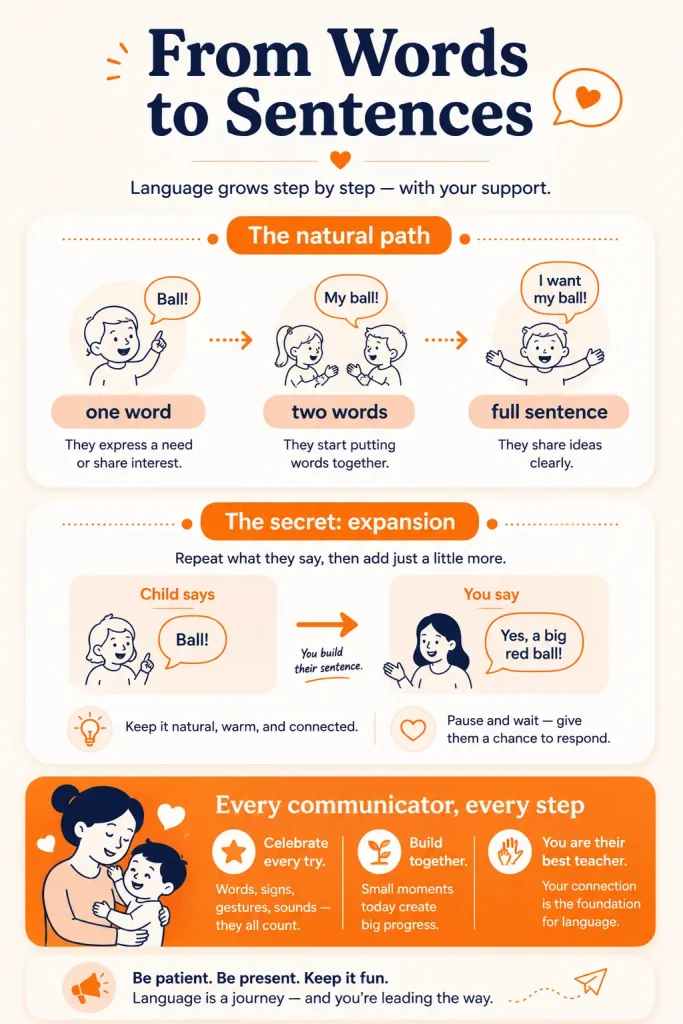
How Children Move From Single Words to Phrases and Sentences
Many children move from single words to short word combinations and then to longer sentences. However, the exact timing and order can differ from child to child. Speech and language milestones are useful guides, not strict deadlines or diagnostic checklists.
A common progression may look like this:
| Current communication | A useful next model | Example |
|---|---|---|
| One word | Add one meaningful word | “Ball” → “big ball” |
| Two words | Add an action, person, or place | “Daddy go” → “Daddy go outside” |
| Short phrase | Add missing information | “Dog running” → “The dog is running” |
| Basic sentence | Add detail | “The dog is running” → “The big dog is running fast” |
The goal is not to correct every grammatical mistake. Early combinations such as “mummy go,” “more milk,” or “dog run” already carry meaningful information.
Instead of saying, “No, say it properly,” model a slightly fuller version:
- Child: “Mummy go.”
- Parent: “Yes, Mummy is going.”
Or:
- Child: “Boy eat.”
- Parent: “The boy is eating.”
This gives your child a useful sentence model without interrupting the interaction.
Try to keep your model close to your child’s current level. If your child uses one word, a seven-word sentence may be too much to imitate or process. A two- or three-word model is often easier to notice.
As phrases become more consistent, you can gradually model:
- who is doing the action;
- what the person is doing;
- what object is involved;
- where it is happening;
- simple describing words;
- early grammar such as “is,” “the,” plurals, and verb endings.
This progression is not identical for every child. Some children may use memorised or scripted phrases before creating flexible combinations. Others may communicate through signs, pictures, or AAC. Focus on whether your child is using language meaningfully and becoming more flexible—not whether every sentence follows one expected path.
How the BASICS App Supports Phrase and Sentence Development
The BASICS App organises speech, language, and communication activities into different learning levels. Its current content includes Phrase Park for short word combinations and Sentence Symphony for sentence construction and sequencing. Official BASICS materials also describe Goal Mode for structured learning paths and Library Mode for choosing specific skills or activities.
Parents can use these activities to:
- show children how words fit together;
- practise common phrase patterns;
- model short sentences with visual support;
- repeat the same language pattern in different examples;
- carry app-based language into everyday routines.
BASICS should not be used as passive screen time. The strongest home practice happens when a parent or caregiver watches with the child, models the words, pauses for a response, and uses the same language later in real life.
Phrase Park: Helping Children Combine Two Words
Phrase Park focuses on combining words into short, meaningful phrases. Official BASICS descriptions include patterns such as colour plus object and action plus object, as well as two- and three-word combinations.
Examples may include:
- red ball;
- big car;
- eat apple;
- throw ball;
- open door;
- more bubbles.
These combinations are useful because they help a child communicate more than a label.
For example:
- “Ball” names an object.
- “Red ball” describes it.
- “Throw ball” expresses an action.
- “Want ball” communicates a request.
While using Phrase Park, choose one phrase pattern at a time.
You might focus on action + object:
- wash hands;
- kick ball;
- eat banana;
- open box.
Or describing word + object:
- big dog;
- blue cup;
- hot food;
- wet shirt.
After the activity, use the same pattern during play or routines. If the app models “open box,” you might later say:
- open door;
- open book;
- open bag;
- open snack.
This helps your child understand that the pattern can be used with different words—not only with the exact picture shown in the game.
Do not repeatedly ask, “What does this say?” or require your child to copy every phrase. Model it, pause, and accept different ways of responding.
Sentence Symphony: Building Longer, Clearer Sentences
Sentence Symphony focuses on sentence construction and sequencing through visual prompts and choices. BASICS materials describe activities involving grammar, sentence formation, picture-based prompts, and arranging information into a meaningful order.
Parents can use these activities to model simple sentence parts:
- Who: The boy
- Action: is eating
- Object: an apple
Together:
“The boy is eating an apple.”
Start with the information your child can manage. A child who currently says “boy eat” does not need to produce a complete six-word sentence immediately.
You can model the fuller sentence while accepting the child’s shorter attempt:
- Child: “Boy eat.”
- Parent: “Yes, the boy is eating.”
As your child becomes more comfortable, add one detail at a time:
- “The girl is running.”
- “The girl is running outside.”
- “The little girl is running outside.”
- “The little girl is running outside with her dog.”
Sentence practice can also include:
- subject and action: “Baby sleeps.”
- action and object: “Wash hands.”
- person, action, and object: “Daddy drives the car.”
- location: “The cat is under the table.”
- describing words: “The tall boy is jumping.”
- time or sequence: “First we wash, then we eat.”
The aim is functional communication, not perfect grammar in every response. A useful sentence helps your child request, describe, answer, protest, share an idea, or tell someone what happened.
Supporting Speech, Signs, Pictures, and AAC
Children can combine meaning in more than one way.
A child may:
- speak two words;
- use two manual signs;
- combine a spoken word with a sign;
- select two or more symbols on AAC;
- point to a picture and add a spoken word;
- use a stored AAC phrase to communicate a message.
These are not all identical language behaviours, but they can each show intentional communication and growing ability to combine ideas.
If your child already uses an AAC system, signs, or picture communication, use the same system while practising BASICS activities. Model the phrase using your child’s communication method rather than focusing only on spoken repetition.
For example, during a “want ball” activity, you might:
- Say “want ball.”
- Point to or select “want” and “ball” on the AAC system.
- Pause.
- Respond to your child’s attempt.
Do not remove or reduce access to AAC in an attempt to make a child speak. A speech-language professional can help choose and personalise an AAC approach when needed.
How Games Can Support Phrase and Sentence Practice
Games can provide repeated exposure to the same language pattern without requiring parents to invent a new activity every time.
However, the game itself is only one part of the learning experience. Children are more likely to understand how language works when an adult connects the game to a meaningful interaction.
Use this simple approach:
1. Choose one language target
Examples:
- action + object;
- describing word + object;
- person + action;
- subject + verb + object.
2. Model the target during the game
Keep your words clear and consistent:
- “Kick ball.”
- “Boy kicks ball.”
- “The boy is kicking the ball.”
Choose the model that is closest to your child’s current language level.
3. Pause without demanding repetition
After modelling, give your child time to:
- look;
- point;
- choose;
- sign;
- vocalise;
- complete part of the phrase;
- use AAC;
- say the phrase.
4. Use the same pattern away from the app
If the game practises “girl eating,” use the same structure later:
- baby sleeping;
- dog running;
- daddy cooking;
- mummy reading.
This real-life carryover is essential. It teaches your child that the phrase pattern is useful beyond one game or picture.
Stop the activity if your child becomes tired, upset, or disengaged. Completing more rounds is not automatically better. A brief interaction with active participation is more useful than continuing after your child has stopped engaging.
How to Practise Phrases and Sentences in Everyday Routines
You do not need a separate lesson every time you practise language. Daily routines already provide repeated actions, objects, people, and predictable events.
During meals
Single word:
“Juice.”
Phrase model:
“More juice.”
Sentence model:
“I want more juice.”
Other useful models:
- cut apple;
- hot food;
- spoon fell;
- Daddy is eating;
- the cup is empty.
While getting dressed
Single word:
“Socks.”
Phrase model:
“Blue socks.”
Sentence model:
“I am putting on my blue socks.”
Other useful models:
- shirt on;
- shoes off;
- zip it;
- Mummy is helping;
- the jacket is too big.
During play
Single word:
“Car.”
Phrase model:
“Car go.”
Sentence model:
“The red car is going fast.”
Other useful models:
- build tower;
- baby sleeping;
- throw ball;
- dinosaur is jumping;
- the train is under the chair.
While reading
Pause to describe pictures rather than asking questions on every page.
Instead of repeatedly asking, “What is this?” try:
- “The dog is running.”
- “The baby is sleeping.”
- “The girl has a red balloon.”
If your child contributes one word, expand it:
- Child: “Balloon.”
- Parent: “A red balloon.”
- Child: “Girl balloon.”
- Parent: “The girl has a balloon.”
Questions can still be useful, but conversation should include comments and models—not feel like a quiz.
During bath time
Useful models include:
- wash hands;
- water hot;
- bubbles popping;
- the duck is floating;
- pour water in the cup.
Choose a few phrases and repeat them naturally. You do not need to narrate every action continuously.
Short practice opportunities across familiar routines may be easier for families to maintain than long, formal home sessions. If your child receives speech therapy, ask the therapist which phrase patterns, sentence forms, signs, or AAC combinations to practise at home.
What Makes BASICS a Speech Therapy App for Kids?
Parents may describe BASICS as a speech therapy app for kids because it contains therapist-designed speech, language, and communication activities. A more accurate description is that BASICS is a guided home-practice app that may complement professional speech therapy when its activities match the child’s goals.
For phrase and sentence practice, useful BASICS features include:
- Phrase Park: activities for combining words into short phrases.
- Sentence Symphony: visual sentence-construction and sequencing activities.
- Goal Mode: structured learning paths based on selected goals.
- Library Mode: access to specific activities for targeted practice.
- Visual prompts: pictures and choices that make sentence relationships easier to see.
- Repeated practice: opportunities to experience the same phrase or sentence pattern in several examples.
- Parent participation: activities that can be connected to communication away from the screen.
Official BASICS materials describe 12 learning levels spanning matching, early words, vocabulary, phrases, WH questions, conversation, social stories, sentence construction, emotions, and other early learning areas.
That breadth is useful, but parents should not move through levels simply because the next level is available. Start with the communication skill your child currently needs.
An app cannot:
- diagnose a language disorder;
- check hearing;
- identify the cause of a delay;
- select an individual AAC system;
- replace a speech-language assessment;
- guarantee phrases or sentences.
Use BASICS as a source of structured practice, examples, and visual support—not as a substitute for personalised clinical care.
Start Phrase and Sentence Practice With the BASICS App
Start small.
Choose:
- one BASICS activity;
- one phrase or sentence pattern;
- three to five useful examples;
- one everyday routine for practice.
For example, your target might be action + object:
In BASICS:
- kick ball;
- eat apple;
- wash hands.
During the day:
- open door;
- throw toy;
- drink milk;
- read book.
Or your target may be person + action:
In BASICS:
- boy running;
- girl eating.
During the day:
- Daddy cooking;
- baby sleeping;
- dog barking;
- Mummy reading.
Use the model, pause, and respond to your child’s attempt. Do not measure progress only by whether they repeat a complete spoken sentence.
Also notice whether your child:
- combines two ideas more often;
- uses a phrase in a new situation;
- adds an action word;
- gives more information;
- creates a new combination independently;
- uses signs, pictures, or AAC more flexibly;
- becomes easier for familiar people to understand.
BASICS provides the structure. Your everyday interaction gives the language a reason to be used.
Who Can Benefit From the BASICS Phrase and Sentence Activities?
These activities may be relevant for a child who:
- uses several single words but rarely combines them;
- is beginning to use two-word phrases;
- uses short phrases but needs help adding information;
- leaves out important sentence parts;
- needs visual support to understand sentence order;
- uses signs, pictures, or AAC to combine ideas;
- is receiving speech-language therapy and has phrase or sentence goals;
- benefits from structured, repeatable home activities.
Families looking for an autism app for kids or a speech therapy app for autism may use BASICS for visual phrase and sentence practice. However, autistic children do not all develop or use language in the same way.
Some autistic children may:
- use spoken language;
- rely mainly on AAC;
- combine speech, signs, and pictures;
- use repeated or scripted phrases;
- understand more than they can express;
- need support with flexible, self-generated language;
- communicate clearly without using conventional spoken sentences.
Do not judge progress only by sentence length. A longer sentence is not automatically more useful than a shorter, intentional message.
Consider speaking with a speech-language professional if your child:
- is not beginning to combine words over time;
- loses words, phrases, or communication skills;
- struggles to understand familiar language or directions;
- is frequently frustrated because communication is difficult;
- mainly repeats phrases without using them flexibly;
- is difficult for familiar people to understand;
- may not be hearing clearly;
- needs support choosing or using AAC.
Children who are late to combine words, have difficulty learning new words, frequently struggle with grammar, or have trouble understanding directions may need a language evaluation. A speech-language pathologist can assess the child’s individual strengths and needs.
Final Thoughts on Helping Your Child Build Sentences
Moving from single words to phrases and sentences usually happens through many small communication experiences.
Start with the language your child already uses. Add one useful piece of information. Model the phrase clearly, pause, and give your child time to respond.
Use BASICS to provide visual structure and repeated examples through Phrase Park and Sentence Symphony. Then take the same phrase pattern into meals, play, dressing, books, and family routines.
Do not demand perfect repetition or compare your child’s sentence length with another child’s. Look for meaningful progress: new combinations, clearer messages, more flexible communication, and growing ability to share information.
The BASICS App may support phrase and sentence practice at home, but it does not replace individual assessment or speech-language therapy.
When you are concerned about your child’s understanding, sentence development, hearing, loss of skills, or overall communication, speak with a paediatrician or speech-language professional.
Related Reading
- Help Your Child Combine Words Into Phrases
- How to Help Your Child Speak in Full Sentences
- How to Help Your Child Answer WH Questions
- How the BASICS App Helps Kids Develop Speech and Language
Clinically Reviewed By
Reviewed by Shravanaveena Gajula, BASLP, M.Sc. Speech and Language Pathology, Audiologist and Speech-Language Pathologist at Wellness Hub.
Shravanaveena supports children and families with speech, language, and communication needs. Her clinical work includes speech-language assessments, receptive and expressive language development, speech-sound concerns, autism-related communication needs, parent counselling, and home-practice guidance.
This article was reviewed for clinical accuracy, parent-friendly language, and safe guidance on helping children move from single words to phrases and sentences.
This content is for educational purposes only and does not replace professional assessment, diagnosis, or speech-language therapy.
View Shravanaveena Gajula’s Profile
References & Further Reading
American Speech-Language-Hearing Association (ASHA). Spoken Language Disorders.
https://www.asha.org/practice-portal/clinical-topics/spoken-language-disorders/
American Speech-Language-Hearing Association (ASHA). Augmentative and Alternative Communication.
https://www.asha.org/practice-portal/professional-issues/augmentative-and-alternative-communication/
National Institute on Deafness and Other Communication Disorders (NIDCD). Speech and Language Developmental Milestones.
https://www.nidcd.nih.gov/health/speech-and-language
National Institute on Deafness and Other Communication Disorders (NIDCD). Developmental Language Disorder.
https://www.nidcd.nih.gov/health/developmental-language-disorder
Centers for Disease Control and Prevention (CDC). Developmental Milestones by 2 Years.
https://www.cdc.gov/act-early/milestones/2-years.html
Centers for Disease Control and Prevention (CDC). Developmental Milestones by 30 Months.
https://www.cdc.gov/act-early/milestones/30-months.html
American Academy of Pediatrics, HealthyChildren.org. Language Delays in Toddlers: Information for Parents.
https://www.healthychildren.org/English/ages-stages/toddler/Pages/language-delay.aspx
American Academy of Pediatrics, HealthyChildren.org. Speech-Language Therapy for Children With Autism Spectrum Disorders.
https://www.healthychildren.org/English/health-issues/conditions/developmental-disabilities/Pages/Speech-Language-Therapy.aspx
Bradshaw, M. L., Hoffman, P. R., and Norris, J. A. Efficacy of Expansions and Cloze Procedures in Preschool Children With Delayed Language Development. Language, Speech, and Hearing Services in Schools.
https://pubmed.ncbi.nlm.nih.gov/27764430/
Common Questions About Speech Therapy Apps, Autism Apps, and Sentence Building
Can an app for speech therapy help my child move from single words to sentences?
An app for speech therapy can give parents structured examples of two-word phrases, sentence patterns, action words, describing words, and early grammar.
It is most useful when a parent joins the activity, models the phrase, pauses for the child to respond, and uses the same words during play and everyday routines.
For example, an app activity may introduce “red car.” Later, the parent can use the same pattern with “blue cup,” “big ball,” or “fast train.”
An app can support practice, but it cannot assess why a child is having difficulty combining words or create an individual treatment plan.
What should parents look for in speech therapy apps for kids?
Useful speech therapy apps for kids should match the child’s current communication level and provide a clear progression from single words to phrases and sentences.
Look for an app that:
- Uses simple visual and spoken models.
- Includes meaningful phrases children can use in daily life.
- Supports action words, describing words, sentence order, and early grammar.
- Encourages parents to participate.
- Allows short, repeatable practice.
- Connects screen activities with everyday communication.
- Supports signs, pictures, gestures, or AAC where appropriate.
- Avoids promising guaranteed speech or rapid results.
- Clearly explains that it does not replace professional speech therapy.
Parents should also review the app’s intended age range, privacy policy, subscription terms, and professional credentials.
How is the BASICS App different from speech therapy for kids?
Speech therapy for kids is provided by a qualified speech-language pathologist who assesses the child’s individual communication skills and creates a personalised plan.
The BASICS App provides guided home-practice activities. Phrase Park supports early word combinations, while Sentence Symphony provides visual practice with sentence formation, sequencing, and grammar.
BASICS may complement suitable therapy goals, but it cannot diagnose a speech or language disorder, check hearing, or replace an individual speech therapy plan.
Can an autism therapy app help an autistic child build phrases and sentences?
An autism therapy app may provide visual, structured, and repeatable language activities. It can help parents model short phrases, action sentences, describing words, WH-question responses, and everyday communication.
However, autistic children have different language profiles. Some use spoken sentences, some communicate through AAC, signs, pictures, or gestures, and others use repeated or scripted phrases.
Activities should be matched to the child’s communication style, sensory needs, interests, and current language level. No single autism therapy app can replace the individual assessment and support that may be provided by qualified professionals.
Can BASICS be used as an autism app for kids who use AAC, signs, or pictures?
Parents can pair BASICS activities with signs, gestures, pictures, or an AAC system already used by their child.
For example, while modelling “want ball,” a parent can:
- Say the phrase aloud.
- Use the corresponding manual signs.
- Select “want” and “ball” on the child’s AAC system.
- Pause and respond to the child’s communication attempt.
The aim is not to force speech. The aim is to help the child communicate intentionally and combine ideas using an effective communication method.
Parents should not remove AAC access in an attempt to encourage spoken language. A speech-language pathologist can help select and personalise an AAC system when needed.
Can a speech therapy app for autism replace a speech-language professional?
No. A speech therapy app for autism cannot complete a comprehensive assessment or determine why a child is having difficulty with language.
A speech-language professional may assess:
- Language understanding.
- Expressive vocabulary.
- Phrase and sentence development.
- Grammar.
- Speech-sound production.
- Social communication.
- Flexible versus repeated language.
- Hearing-related concerns.
- AAC needs.
An app may support appropriate goals at home, but it should not be treated as a substitute for professional care.
How should parents use a sentence-building app at home?
Choose one phrase or sentence pattern rather than completing many activities in one session.
For example, practise person + action:
- Daddy cooking.
- Baby sleeping.
- Dog running.
Or practise action + object:
- Kick ball.
- Wash hands.
- Open box.
Use the sentence-building app for one short activity. Then repeat the same pattern during meals, dressing, books, play, or outdoor routines.
Model the phrase, pause, and respond to your child’s attempt. Do not require perfect repetition before continuing the activity.
Progress may include your child:
- Combining two ideas.
- Adding an action word.
- Using a familiar phrase in a new situation.
- Giving more information.
- Creating a new combination independently.
- Using signs, pictures, or AAC more flexibly.
Is a longer sentence always a sign of better communication?
No. Sentence length is only one part of communication.
A short message such as “help me,” “want break,” or “go outside” may be more useful than a longer sentence repeated without understanding.
Parents should also notice whether the child:
- Communicates intentionally.
- Creates new word combinations.
- Uses language in different situations.
- Responds to other people.
- Shares needs, ideas, or experiences.
- Uses speech, signs, pictures, or AAC effectively.
The goal is meaningful and flexible communication, not simply producing the longest possible sentence.
When should parents seek professional speech therapy instead of relying only on an app?
Speak with a speech-language professional if your child:
- Is not beginning to combine words over time.
- Loses words, phrases, or other communication skills.
- Has difficulty understanding familiar language or directions.
- Uses very limited phrase or sentence patterns.
- Mainly repeats phrases without using them flexibly.
- Becomes frequently frustrated when trying to communicate.
- Is difficult for familiar people to understand.
- May not be hearing clearly.
- Needs help choosing or using AAC.
Parents do not need to wait for an app or home activity to produce results before asking for professional guidance.
Book your Free Consultation Today
Parent/Caregiver Info:
Client’s Details:
* Error Message