BASICS App to Teach First Words: Where to Start
Last Updated: July 14, 2026
Use the BASICS App for guided first-word videos, games, and everyday activities that support early communication for toddlers, late talkers, and autistic children.
Waiting for your child’s first word can feel exciting, uncertain, and sometimes worrying. You may be wondering which words to teach, how often to practise, or whether an app can help.
The BASICS App gives parents a structured starting point. It combines early communication activities, first-word videos, games, visual learning, and practical guidance that parents can use during everyday routines. For families looking for an app to teach first words, BASICS offers a clear path without turning communication into a test.
This guide explains where first words begin, how to use BASICS for short home-practice sessions, and when it may be helpful to speak with a speech-language professional. BASICS can support home practice, but it does not replace an assessment, diagnosis, or individual speech therapy plan.
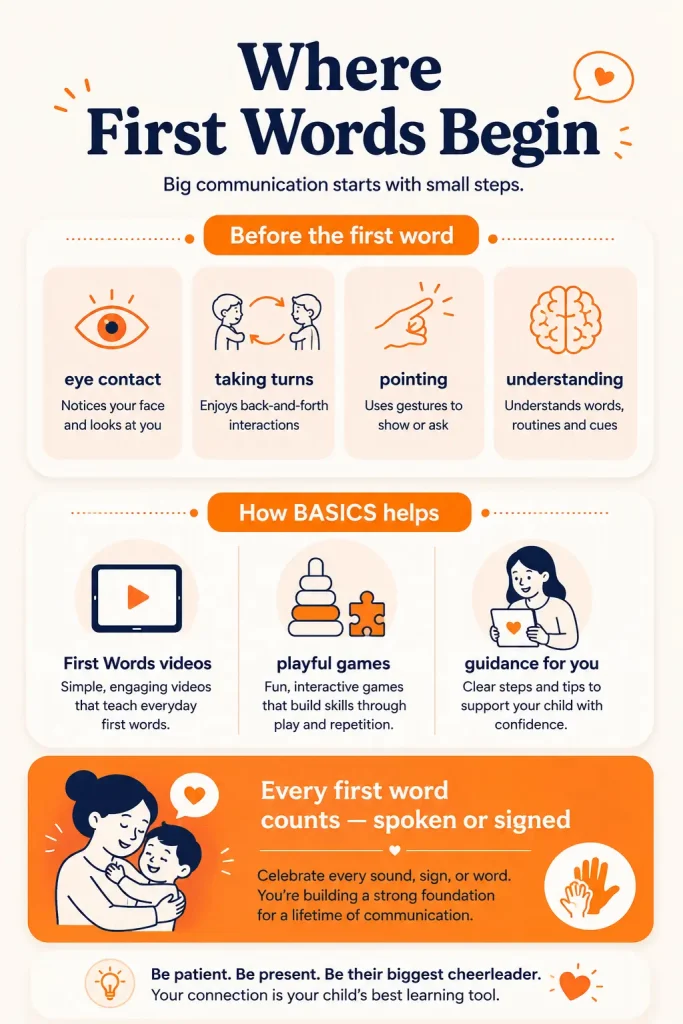
Every First Word Counts – Spoken, Signed, or Selected
A first word does not always have to be spoken clearly.
Some children communicate a meaningful word through a manual sign. Others may intentionally select a picture, symbol, or word on an augmentative and alternative communication device. These can function as words when a child uses them consistently and intentionally to communicate a specific meaning.
Pointing, reaching, looking, vocalising, and using gestures are also valuable communication attempts, even when they are not yet words.
The important question is whether your child is intentionally using the sound, sign, gesture, or symbol to share a message.
For example, your child may:
- Say or sign “more” to ask for another snack.
- Select “ball” on a communication device to request a toy.
- Point towards the door and look at you when they want to go outside.
- Make a familiar sound while reaching for a favourite object.
These attempts show that your child is beginning to understand that communication can influence what happens next.
Augmentative and alternative communication, or AAC, may include vocalisations, gestures, manual signs, picture-based systems, and speech-generating devices. Children may use one communication method or combine several methods based on their needs.
Parents can pair BASICS activities with signs, gestures, pictures, or AAC that their child already uses. For example, you can model the spoken word “more” during an app activity while also using your child’s sign or AAC symbol for “more.”
If you are concerned about your child’s communication, understanding, hearing, or loss of previously used words, speak with a speech-language professional rather than waiting for an app to resolve the concern.
First Words Begin With Early Communication Skills
Children begin developing communication skills before they use recognisable words.
These early skills may include:
- Noticing and responding to people.
- Sharing attention around an object or activity.
- Taking turns during simple interactions.
- Copying actions, sounds, or facial movements.
- Using gestures such as pointing, giving, showing, or reaching.
- Understanding familiar words and everyday directions.
- Making sounds or movements to gain another person’s attention.
A child does not need to master every skill before learning a word. Communication development is not a fixed checklist, and children may build these abilities in different orders.
However, these early skills give children more opportunities to notice language, connect words with meaning, and communicate intentionally.
Children develop speech and language at different rates, but development generally follows a broad progression. Milestones can help parents and professionals decide whether a child may need additional support; they should not be treated as a diagnosis or rigid deadline.
The BASICS App begins with early communication and foundational learning rather than presenting a long list of words to memorise. Foundation Forest includes activities involving matching, sounds, memory, and early recognition. These activities can give parents a structured way to practise looking, listening, choosing, and responding before or alongside first-word work.
How the BASICS App Helps Teach First Words
Children often need to see and hear a word repeatedly in meaningful situations before they understand or use it.
BASICS supports this process through visual modelling, repeated practice, games, and parent-guided activities. The app gives parents a starting point, but the interaction around the activity matters just as much as what appears on the screen.
The app is not intended to place a child in front of a screen and expect words to appear. Parents get more value when they watch together, pause, respond, repeat important words, and connect app activities with real situations.
First Words Videos: See and Hear Each Word
BASICS includes video modelling and visual first-word activities across familiar categories such as animals, foods, actions, and everyday objects. These activities give your child an opportunity to see an item, hear its name, and connect the word with a clear visual meaning.
You can make the videos more useful by watching together:
- Choose one or two useful words.
- Say the word clearly while the video plays.
- Pause and give your child time to look, point, sign, imitate, or respond.
- Use the same word in a real activity later that day.
For example, after watching a video containing the word “banana,” use it again during snack time:
“Banana.”
“Cut banana.”
“More banana?”
Your child does not need to repeat the word immediately. Looking, reaching, pointing, signing, vocalising, or selecting the correct symbol can show that your child is engaging with the meaning.
Keep your language simple. Avoid turning the video into a series of questions such as “What is this?” or repeatedly asking your child to copy the word.
Foundation Forest Games: Playful Early Practice
Foundation Forest contains activities that focus on early learning foundations such as matching, sound recognition, and memory. These games give children opportunities to look, listen, choose, match, and respond.
Those skills may support later word learning when the games are combined with active parent interaction.
Keep each activity short. Instead of asking your child to complete several games in one sitting, choose one activity and repeat a few useful words.
You might say:
“Match.”
“Same.”
“Your turn.”
“Find the dog.”
“You found it.”
Avoid correcting every response or repeatedly asking, “What is this?” The activity should create opportunities to listen and communicate, not feel like an examination.
When your child chooses incorrectly, model the answer calmly and continue. The goal is to keep the interaction useful and comfortable rather than focusing on whether every response is correct.
Clear First-Word Guidance for Parents
One of the hardest parts of teaching first words is deciding where to begin.
Parents may choose words that are easy to picture but not very useful to their child. BASICS provides a more organised path through early communication, first words, vocabulary, and later phrase-building activities.
The app includes a structured Goal Mode and a more flexible Library Mode. Goal Mode allows parents to follow a selected learning pathway, while Library Mode allows parents or therapists to choose a specific level or activity for targeted practice.
Whichever mode you use, begin with words your child has a reason to communicate.
Good early targets may include:
- People: mama, papa, baby
- Requests: more, help, open
- Actions: go, eat, wash, sleep
- Social words: hi, bye, yes, no
- Favourite items: ball, car, milk, bubbles
- Routine words: bath, shoes, outside, finished
A useful first word is not necessarily the word that appears easiest to pronounce. It is a word that helps your child request, refuse, comment, connect with someone, or participate in a familiar routine.
Start with three to five words rather than a long list. Use those words regularly during both BASICS activities and everyday life.
Follow Your Child’s Lead Without Pressure
Your child may be more likely to notice a word when it is connected to something they already enjoy.
If your child loves bubbles, model words such as:
“Bubble.”
“More.”
“Pop.”
“Big bubble.”
If your child enjoys cars, try:
“Car.”
“Go.”
“Stop.”
“Fast car.”
You can model the word without requiring your child to copy it. Pause after speaking and notice how your child responds.
They may:
- Look towards the item.
- Move closer.
- Smile or laugh.
- Point or reach.
- Use a sign.
- Make a sound.
- Attempt part of the word.
Acknowledge the response and continue the interaction. For example, if your child reaches for the bubbles, you can say, “More bubbles,” and then blow them.
Avoid asking your child to repeat the same word several times before receiving the object they want. Communication should remain useful and connected to the activity.
Where to Start With the BASICS App
You do not need to explore every BASICS activity at once. Begin with one small communication goal.
Step 1: Notice how your child already communicates
Watch for sounds, gestures, signs, pictures, actions, or words your child uses intentionally.
Notice when communication happens most easily. Your child may communicate more during meals, movement play, music, outdoor activities, or time with a favourite person.
Step 2: Choose three to five useful words
Select words connected to your child’s favourite people, foods, toys, activities, and daily routines.
Choose words that give your child a practical reason to communicate. Words such as “more,” “help,” “go,” “open,” and “finished” can often be used in several situations.
Step 3: Find a matching BASICS activity
Choose a relevant first-word video, Foundation Forest game, or early communication activity.
Keep the first activity familiar and manageable. You do not need to introduce several new goals in the same session.
Step 4: Practise the same words away from the screen
Use the target words during meals, play, dressing, bath time, books, or outdoor activities.
A word becomes more useful when your child experiences it in different real-life situations.
Step 5: Pause and respond
After modelling a word, wait. Your child may need extra processing time before responding.
They may respond with a look, movement, gesture, sound, sign, picture, AAC selection, or spoken attempt. Respond to the communication rather than waiting only for a clear spoken word.
For example, if the target word is “open,” use it while opening:
- A BASICS activity.
- A snack container.
- The front door.
- A toy box.
- A favourite book.
The app provides structure, but real-life use gives the word a practical purpose.
First-Word Practice in Everyday Routines
First-word practice does not need to become a separate lesson.
You can use BASICS for a few focused minutes and then carry the same words into your child’s day.
During breakfast:
“Cup.”
“Milk.”
“More.”
“Finished.”
While getting dressed:
“Shirt.”
“Socks.”
“On.”
“Off.”
During play:
“Ball.”
“Go.”
“Throw.”
“My turn.”
During bath time:
“Water.”
“Wash.”
“Wet.”
“Dry.”
Use words that match what is happening. Your child does not need to stop playing, sit at a table, or copy every word for the practice to be useful.
Follow your child’s response rather than trying to complete a fixed number of repetitions. Some days your child may watch closely. On other days, they may prefer to move, play, or communicate in another way.
Short, consistent opportunities are often more realistic for families than long practice sessions. Stop before your child becomes tired or frustrated.
If your child is receiving professional speech therapy, ask the therapist which words, signs, AAC symbols, or communication goals would be most useful to practise through BASICS at home.
What Makes BASICS a Speech Therapy App for Kids
BASICS is commonly described as a speech therapy app for kids because it provides therapist-designed speech, language, and communication activities. More accurately, it is a guided home-practice app that may complement — but does not replace — assessment or therapy from a qualified speech-language professional.
Official BASICS materials describe a structured learning path covering early foundations, first words, speech sounds, vocabulary, WH questions, phrase development, sentences, social communication, and emotional learning for children aged 2–8.
Features relevant to first-word practice include:
- Early communication before vocabulary: Foundation activities allow children to practise matching, listening, sounds, memory, choosing, and responding.
- Visual first-word modelling: Videos and picture-based activities help connect spoken words with familiar objects and actions.
- Organised progression: Parents can move from early communication to first words, vocabulary, phrases, and sentences.
- Goal Mode and Library Mode: Families can follow a structured goal or choose a specific activity for targeted practice.
- Parent participation: Activities can be repeated and connected with daily routines away from the screen.
- Multiple communication methods: Parents can pair spoken words with signs, gestures, pictures, or AAC already used by their child.
- Home-practice support: BASICS may be used to reinforce suitable goals recommended during speech therapy for kids.
The strongest difference is not simply the number of activities. It is the connection between the app and what parents do before, during, and after each activity.
The app works best when parents turn screen-based words into real communication: showing the object, modelling the word, pausing, and responding to the child.
Start First-Word Practice With BASICS
Use BASICS to choose a small set of meaningful words, model them clearly, and practise them during real routines.
Start with:
- One short BASICS activity.
- Three to five useful words.
- One everyday routine where those words naturally fit.
- Enough time for your child to respond in their own way.
BASICS can provide structure for first-word practice, but your interaction remains central. Watch together, repeat important words, follow your child’s interests, and use the words again during daily life.
Do not measure success only by whether your child repeats a spoken word. Also notice whether they:
- Look towards the correct object.
- Follow a familiar instruction.
- Reach or point intentionally.
- Use a sign or AAC symbol.
- Make a consistent sound.
- Begin using the word in another routine.
These responses can help you understand whether your child is connecting the word with its meaning.
Explore first-word and early communication activities in the BASICS App.
Who Can Use BASICS as an Autism App for Kids?
BASICS is designed for children aged 2–8 and may be relevant for parents supporting:
- A toddler beginning to communicate.
- A child who uses few spoken words.
- A late talker who needs more structured home practice.
- A child with a speech or language delay.
- A child who communicates through gestures, signs, pictures, or AAC.
- A child receiving guidance from a speech-language professional.
- An autistic child who benefits from visual, structured, and repeatable learning activities.
Families searching for an autism app for kids or a speech therapy app for autism may find activities in BASICS that support early communication, first words, vocabulary, questions, social communication, and parent-guided home practice. Official Wellness Hub materials position BASICS for children aged 2–8, including children with speech delay, autism, ADHD, and other early learning needs.
However, this does not mean the same activity or learning path will suit every child. Autistic children have different communication styles, sensory needs, interests, strengths, and support requirements.
Some children may enjoy visual app activities. Others may need shorter sessions, fewer sounds, movement breaks, different images, AAC support, or activities led by a familiar adult.
Families comparing an app with professional speech therapy for kids should not treat the two as interchangeable. A speech-language professional can assess:
- Understanding and expressive language.
- Speech-sound production.
- Hearing-related concerns.
- Social communication.
- Play and interaction.
- AAC needs.
- Individual developmental goals.
BASICS can then be used to support appropriate goals at home when those activities suit the child’s needs.
Final Thoughts on Teaching First Words
First words develop through many small communication experiences.
Your child may begin by looking, reaching, pointing, signing, vocalising, imitating, or selecting a symbol. Notice these attempts and respond to them.
Choose useful words. Say them during meaningful activities. Give your child time to take part without requiring an immediate spoken response.
The BASICS App can make first-word practice easier to organise through early communication activities, visual word modelling, games, and parent guidance. Its role is to support your interaction, not replace it.
Celebrate progress without promising a particular outcome or deadline. If your child is not developing communication skills as expected, loses abilities they previously used, struggles to understand familiar language, or may not be hearing clearly, ask a speech-language professional or paediatrician for guidance.
Every meaningful communication attempt is a place to begin.
Related Reading
- How to Teach First Words at Home: A Parent Guide
- My Toddler Is Not Talking Yet: What Parents Should Check First
- Speech Therapy App for Kids: A Complete Parent’s Guide
- How the BASICS App Helps Kids Develop Speech and Language
Clinically Reviewed By
Reviewed by Rajini Darugupally, M.Sc. Speech Language Pathology, Speech-Language Pathologist at Wellness Hub.
Rajini has more than 10 years of experience supporting children and families with delayed speech and language development, receptive and expressive language, speech-sound concerns, social communication, autism-related communication needs, play skills, assessments, intervention, and parent guidance.
This article was reviewed for clinical accuracy, parent-friendly language, and safe guidance on first-word development and app-supported home practice.
This content is for educational purposes only and does not replace professional assessment, diagnosis, or speech-language therapy.
View Rajini Darugupally’s Profile
Common Questions for Parents
Can a speech therapy app help a child learn first words?
A speech therapy app can give parents structured activities for modelling useful words, practising early communication, and repeating words through visuals, games, and everyday routines.
The app works best when a parent watches with the child, repeats the target words, pauses for a response, and uses the same words away from the screen. It should support parent-child interaction rather than replace it.
How is the BASICS App different from speech therapy for kids?
Speech therapy for kids is provided by a qualified speech-language professional who assesses a child’s individual communication needs and creates a personalised plan.
The BASICS App provides guided home-practice activities for areas such as early communication, first words, speech sounds, vocabulary, questions, and phrase development. Parents may use it between therapy sessions or as structured home practice, but it does not provide an assessment or replace professional speech therapy.
Can autistic children use BASICS as an autism app for kids?
BASICS may be useful as an autism app for kids who benefit from visual, structured, and repeatable communication activities. Parents can use it to practise early words, matching, listening, vocabulary, questions, and social communication.
However, autistic children have different communication styles, sensory preferences, interests, and support needs. Some children may need shorter activities, movement breaks, AAC support, fewer sounds, or guidance from a speech-language professional.
Can a speech therapy app for autism support children who do not speak?
A speech therapy app for autism may support early communication even when a child is not using spoken words. Parents can pair activities with gestures, manual signs, pictures, or an AAC system already used by the child.
The goal should not be to force speech. The goal is to help the child understand language, communicate intentionally, and use the communication method that works for them.
Is an autism therapy app a replacement for professional therapy?
No. An autism therapy app cannot assess a child’s hearing, language comprehension, speech production, social communication, sensory needs, or AAC requirements.
An app may provide useful home activities, but professional autism therapy or speech-language support should be considered when a child loses communication skills, struggles to understand familiar language, has difficulty communicating needs, or when parents have ongoing concerns.
What should parents look for in a speech therapy app for kids?
A useful speech therapy app for kids should:
- Include activities suited to the child’s current communication level.
- Use clear visuals and simple language.
- Encourage parent participation.
- Allow short, repeatable practice.
- Connect app activities with everyday routines.
- Support gestures, signs, pictures, or AAC where appropriate.
- Avoid promising guaranteed speech or rapid results.
- Clearly explain that the app does not replace professional therapy.
Parents should also check the intended age range, privacy information, subscription terms, and whether the activities have been developed or reviewed by qualified professionals.
How long should a child use a speech or autism app each day?
There is no single daily time that suits every child. Short, focused activities are often easier to use than long sessions.
Parents can begin with one brief activity and then practise the same words during meals, play, dressing, books, or outdoor routines. Stop when the child becomes tired, frustrated, or disengaged. The quality of the interaction matters more than completing a fixed amount of screen time.
When should parents consider speech therapy for kids?
Parents may consider speaking with a speech-language professional if their child:
- Is not developing new communication skills over time.
- Has lost words, gestures, or abilities they previously used.
- Has difficulty understanding familiar words or directions.
- Rarely communicates needs or interests intentionally.
- Appears frustrated because communication is difficult.
- May not be hearing sounds or speech clearly.
- Needs help using signs, pictures, or AAC.
Parents do not need to wait for an app or home activity to produce results before asking for professional guidance.
Book your Free Consultation Today
Parent/Caregiver Info:
Client’s Details:
* Error Message